
Speaking and Writing - PTE Core

Write Email

Write Email is PTE Core’s main writing task: a situation with bullet points to cover, nine minutes, 50–120 words, and seven scored traits including one for email conventions. Here is what each trait checks, an email shape that covers every bullet inside the time, and the mistakes that cost the most.

9 min
to write
50–120
words for full Form credit
2–3
items per test
15
marks across seven traits

The task

Write Email comes after Summarize Written Text in PTE Core, closing the Speaking and Writing part. Two or three items, each with its own nine-minute timer.

Appears inPTE Core only — Speaking & Writing part
Items per test2–3
PromptSituation of up to 100 words plus bullet points to cover
Time to write9 minutes
Word limit50–120 words for full Form credit; 30–49 or 121–140 score 1; under 30 or over 140 score 0
Task ruleAddress every bullet point; match the formal or informal register of the reader
ScoringPartial credit — Content 0–3, Email conventions 0–2, Form 0–2, Organization 0–2, Vocabulary 0–2, Grammar 0–2, Spelling 0–2
Negative markingNone
Skills creditedWriting
In the exam
  1. The situation and the bullet points appear with the answer box

    A prompt of up to 100 words describes who you are writing to and why, followed by three to five bullet points the email must cover. A word counter and Cut, Copy and Paste buttons sit with the box. The nine-minute countdown starts immediately.

  2. Nine minutes for reading, writing and checking

    One minute to read and note the register, six to write, two to check is a workable split. The bullets are your paragraph plan, so there is little else to plan.

  3. The item closes at nine minutes or when you click Next

    The text in the box is the email. Unused time is not carried to the next item, so spend the last two minutes checking the bullets and the spelling.

  4. Two or three items in different registers

    One may be to a friend, another to a manager, landlord or company. The prompt tells you who the reader is, and the register you choose is scored.

How one item is scored

Question

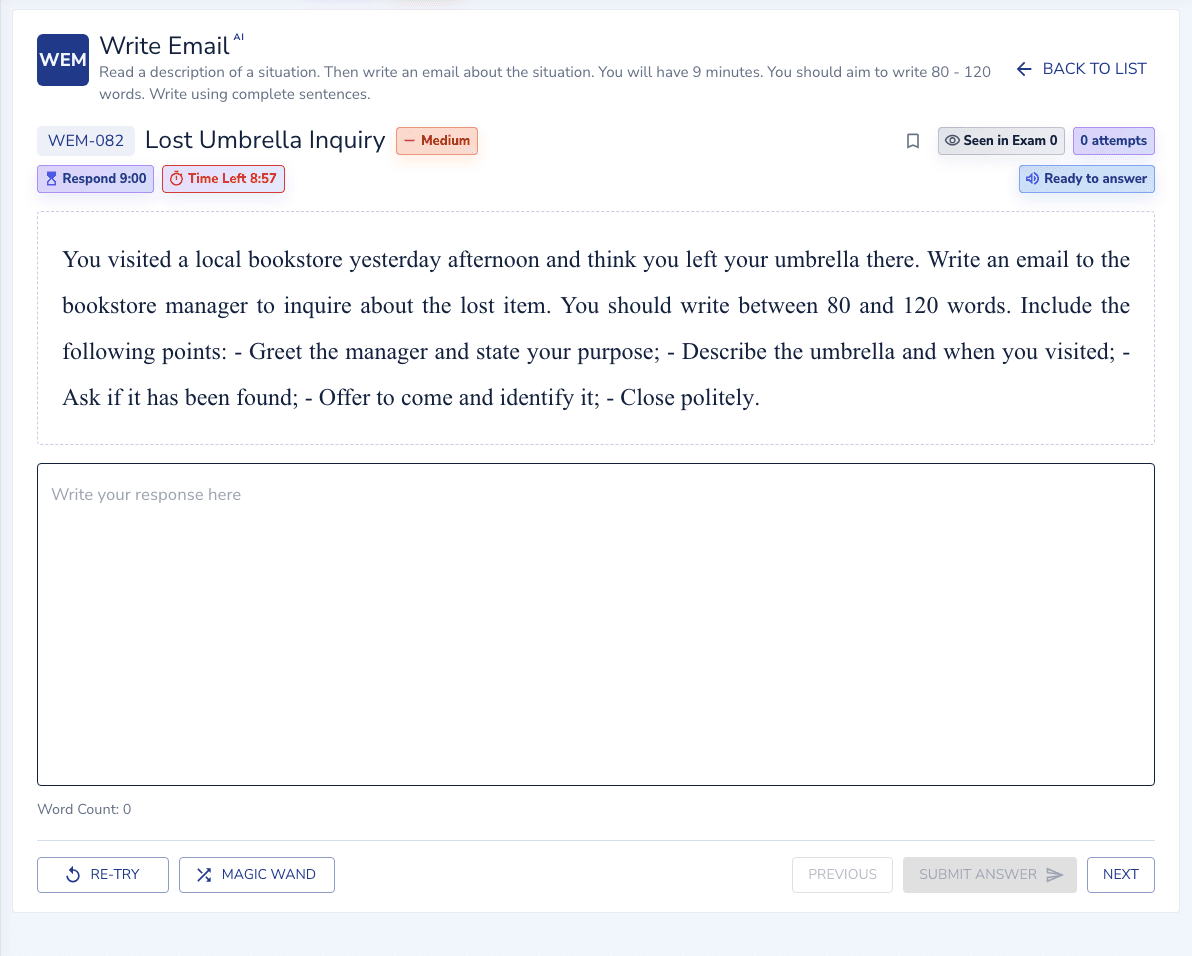
“You visited a local bookstore yesterday afternoon and think you left your umbrella there. Write an email to the bookstore manager…” covering five bullet points: greeting and purpose, description and time, whether it was found, offering to identify it, closing politely. (Real bank question — shown in the player below. 9 minutes.)

Answer

Dear Manager,

I am writing because I believe I left my umbrella at your bookstore yesterday afternoon. It is a blue folding umbrella with a wooden handle. I was browsing the fiction section around 3 PM and may have left it near the window. Could you please check the lost and found for me? If found, I can come by to pick it up. Thank you for your help.

Sincerely,
Mia

Why it scores

It covers every bullet point in a polite, consistent register; at ~70 words it sits inside the 50–120 full-credit band.

What loses marks

“Hello, I am writing to you regarding the matter mentioned above. I hope this email finds you well. I would be grateful if you could help me with this issue at your earliest convenience. Thank you for your time and consideration. Kind regards.” It has the shape of an email and nothing of this email: no umbrella, no time, no description, no offer to identify it. The bullets are not addressed, so Content is 1 at best, and the stock phrases are the pre-prepared material the 0 descriptor describes. At 45 words, Form is 1 as well.

How it is scored

Seven traits with partial credit, all counting towards Writing: Content 0–3, Email conventions 0–2, Form 0–2, Organization 0–2, Vocabulary 0–2, Grammar 0–2 and Spelling 0–2. Most are short scales, so each is decided by one or two things you can check.

Content: 0–3 for addressing every requirement appropriately

A 3 addresses the requirements of the task sufficiently and appropriately. A 2 addresses the task with some success. A 1 attempts it but is not successful, with the task or topic misunderstood. A 0 does not deal with the task, including responses built from significant amounts of pre-prepared or memorised material.
Email conventions: 0–2

A 2 has conventions that are obvious, appropriate and correct for the prompt: a greeting that fits the reader, an opening line that states the purpose, a sign-off and a name. A 1 has them inconsistent, missing elements, or ineffective, including too brief or wrong register. A 0 has them limited or missing.

Form: 2 for 50–120 words

A 2 is 50–120 words. A 1 is 30–49 or 121–140. A 0 is fewer than 30 or more than 140, or an email in capital letters or without punctuation.

Organization: 0–2

A 2 has a structure that is clear and easy to follow, with ideas presented logically and transitions that guide the reader. A 1 is generally acceptable with some unclear relationships between parts. A 0 has structure missing or inappropriate. One short paragraph per bullet, in the order given, earns this trait almost by itself.

Vocabulary and Grammar: 0–2 each

Vocabulary 2 is good command of words appropriate to the situation; 1 is a limited range with some imprecision. Grammar 2 is generally consistent control with only occasional errors; 1 is a fair degree of control with errors that do not cause the reader undue effort.

Spelling: 2, 1 or 0

A maximum of two spelling or typing errors scores 2. Three or four score 1. Numerous errors that cause the reader effort score 0. The Core scale is more forgiving than Academic’s, but a two-minute check still protects a full trait.

Content 0 explicitly names pre-prepared or memorised material. A memorised email body that could follow any prompt scores 0 on Content and 1 at best on Conventions, because the register will not match the reader.

Templates that score full marks

Every template below is taught inside EdKnot and verified against the same AI scoring engine that marks your practice — out of 15 for this task.

Template 1 — formal email
Dear [NAME],

I am writing about [PURPOSE].

[REQUESTED POINT 1]. [REQUESTED POINT 2].

[REQUEST OR NEXT STEP].

Kind regards,
[YOUR NAME]
Template 2 — informal email
Hi [NAME],

Hope you're doing well! I'm writing about [PURPOSE].

[REQUESTED POINT 1]. [REQUESTED POINT 2].

[ASK OR NEXT STEP].

Thanks,
[YOUR NAME]
Worked example — Defective Product Refund Request

Dear Customer Support Team, I am writing to request a refund or exchange for a defective device I purchased from your online store. The product is a BeatSound wireless speaker, order number BS-20817,…

Template 1 · 114 words · every requested point covered in prompt order - scored 15/15 on this scoring engine.

How to answer it

The bullet points are the plan. Turn each into one or two sentences, wrap them in the conventions the reader expects, and check the count. Nine minutes is enough when nothing is invented.

  1. Minute 0–1: reader, register, bullets

    Who is the reader and how well do you know them? That fixes the greeting (“Hi Sam” or “Dear Ms Patel” or “Dear Sir or Madam”) and the sign-off (“Cheers” or “Kind regards”). Count the bullets; each becomes a short paragraph.

  2. Minute 1–2: greeting and purpose

    Greeting on its own line. Then one sentence that says why you are writing, using the situation from the prompt in your own words: “I think I left my umbrella in your shop yesterday afternoon.”

  3. Minutes 2–6: one short paragraph per bullet, in order

    One or two sentences each. Make each specific to the prompt: the colour of the umbrella, the time, the section of the shop. Specific detail is what “addresses the requirements sufficiently” means, and it is what stock phrases cannot supply.

  4. Minute 6–7: close and sign off

    One closing line that fits the register and asks for or offers the next step (“Could you let me know if it turns up?”), then the sign-off and a name on their own lines.

  5. Minutes 7–9: check bullets, count, spelling

    Tick each bullet against a paragraph. Read the counter: 50–120, ideally 80–110. Then read every word for spelling, then each sentence for a verb that agrees with its subject.

Common mistakes

MistakeWhy it costs marksWhat to do instead
Skipping a bullet pointWhy it costs marksContent is scored on addressing the requirements of the task. A missing bullet is a requirement not met, which is the difference between 3 and 2 or lower.What to do insteadOne paragraph per bullet, in the order given. Tick them off at minute seven.
A memorised email bodyWhy it costs marksContent 0 explicitly names significant pre-prepared or memorised material, and stock phrases cannot carry the specifics the bullets ask for.What to do insteadPrepare only the conventions: greetings, a purpose-line pattern, sign-offs. Write everything else from the prompt.
Wrong register for the readerWhy it costs marks“Hey” to a landlord or “Dear Sir or Madam” to a friend is “inappropriate register” under Email conventions and reads as not understanding the situation under Content.What to do insteadDecide the reader in the first thirty seconds and choose the greeting and sign-off to match.
No greeting or sign-offWhy it costs marksEmail conventions limited or missing is a 0 on that trait, regardless of how good the body is.What to do insteadGreeting on its own line at the top, sign-off and name on their own lines at the bottom, every time.
Under 50 wordsWhy it costs marksForm drops to 1 at 30–49 and to 0 below 30. Short emails have almost always skipped a bullet as well.What to do insteadTwo sentences per bullet with a specific detail in each lands at 80–110 words naturally.
One long paragraphWhy it costs marksOrganization rewards a structure that is easy to follow. A single block hides the bullets and the transitions between them.What to do insteadA blank line between the greeting, each bullet’s paragraph, the closing and the sign-off.
Three typing errorsWhy it costs marksSpelling drops from 2 to 1 at three errors. Typing slips count the same as spelling errors.What to do insteadRead for spelling alone in the last two minutes, before anything else.

How to practise

Write Email rewards a fixed shape applied to changing situations. Practise the shape until greetings, purpose lines and sign-offs are automatic in both registers, so the nine minutes go on the bullets.

  1. Write under the nine-minute timer with the counter visible

    Use the real countdown. Finish writing by minute seven so the check is never skipped. If you regularly run out of time, the purpose line or the closing is taking too long, and both can be prepared.

  2. Score the bullets and the register yourself

    After each email, tick every bullet against a sentence that addresses it specifically, then ask whether the reader named in the prompt would find the greeting and sign-off natural. The scoring review shows the seven traits separately, so a missed bullet or a register slip is visible as a Content or Conventions mark.

  3. Alternate formal and informal prompts

    Landlord, manager, customer service, then friend, neighbour, colleague. The shape is the same; the greeting, sign-off and contractions change. Switching registers on demand is what the exam tests.

  4. Build two small phrase banks

    Five openers and five closers for formal readers, five of each for informal. They are conventions, not content, so preparing them is safe. The body of the email must still come from the prompt.

  5. Keep a spelling and typing list

    Three errors drop the trait to 1. Most learners have a short personal list of words and a habit of one typing slip, usually a doubled letter. Reading the list before each session removes most of them.

Practice set

12 prompts with answers

Items from the EdKnot bank, each with its answer, on one page. Every item opens in the practice player with its timer, recording and scoring.

Write Email practice inside the EdKnot question player

What 65 and 79 need

Write Email is scored per item and has two or three items, so it carries most of the Core Writing score. On the CLB scale, 65 sits around CLB 7 and 79 around CLB 9. These are the typical profiles behind each level.

65

All bullets addressed, one of them briefly, in the right register with a greeting and sign-off, inside 50–120 words. A couple of grammar slips that do not cause effort, and one or two spelling or typing errors. Content 2–3, Conventions 2, Organization 1–2.

79

Every bullet addressed with a specific detail from the prompt, one paragraph each, in a register that matches the reader from greeting to sign-off, 80–110 words. Transitions that guide the reader, occasional errors at most, and no more than one spelling slip. Content 3, Conventions 2, Organization 2, Form 2.

Frequently asked questions

How many words should PTE Write Email be?

Aim for 80–110 words. Full Form credit spans 50–120 words, 30–49 or 121–140 scores 1, and under 30 or over 140 scores 0. You have 9 minutes.

Is Write Email in PTE Academic?

No. Write Email is a Core-only task; it does not appear in PTE Academic.

Do I have to cover every bullet point in Write Email?

Yes. Content is scored on whether the email addresses the requirements of the task sufficiently and appropriately, and each bullet is a requirement. One short paragraph per bullet, in the order given, is the safest shape.

How is PTE Write Email scored?

Seven traits: Content 0–3, Email conventions 0–2, Form 0–2, Organization 0–2, Vocabulary 0–2, Grammar 0–2 and Spelling 0–2. The item counts towards Writing.

What are email conventions in PTE Write Email?

A greeting that fits the reader, an opening line stating the purpose, a closing line, a sign-off and a name, each on their own line. Missing or mismatched elements score 1; limited or missing conventions score 0.

Can I use a template for PTE Write Email?

Prepared greetings and sign-offs are fine because they are conventions. A memorised body is not: Content 0 explicitly names pre-prepared or memorised material, and stock phrases cannot supply the specific details the bullets require.

Every bullet point addressed, in email form, in the right register, inside 50–120 words.

Practise Write Email with the real clock and see the answer the moment you submit.

Practise Write Email