
Plus one per correct click
Each word that really differs from the audio, clicked, is a point. Five differing words means a maximum of five.
Listening - PTE Academic / UKVI, PTE Core
Highlight Incorrect Words shows a transcript that differs from the audio in a handful of words, and asks you to click them as they pass. One point per correct click, minus one per wrong click, counting towards Listening and Reading. Here is how to keep pace with the audio, why a doubtful click is worse than no click, and how to stop the cursor falling behind.
Highlight Incorrect Words sits near the end of the Listening part, on the shared clock, just before Write From Dictation.
| Appears in | PTE Academic / UKVI and PTE Core — Listening part |
|---|---|
| Items per test | Academic 2–3 · Core 1–2 |
| Audio length | 15–50 seconds, plays once |
| Time | No per-item timer — shared Listening clock |
| Scoring | 1 point per correctly clicked word |
| Negative marking | Yes — −1 per wrong click, item floored at 0. Click only clear differences. |
| Skills credited | Listening and Reading |
The text is on screen during a short countdown. The recording is 15–50 seconds and follows the transcript word for word, except for a few words that have been changed on screen. Usually four to seven words differ.
Click a word to highlight it; click again to remove the highlight. The audio does not pause, so the clicking happens live, at speaking pace.
There is no per-item timer. Look at each highlighted word once. If you cannot remember hearing something different there, remove the highlight.
No returning to a Listening item. Two or three items in Academic, one or two in Core.
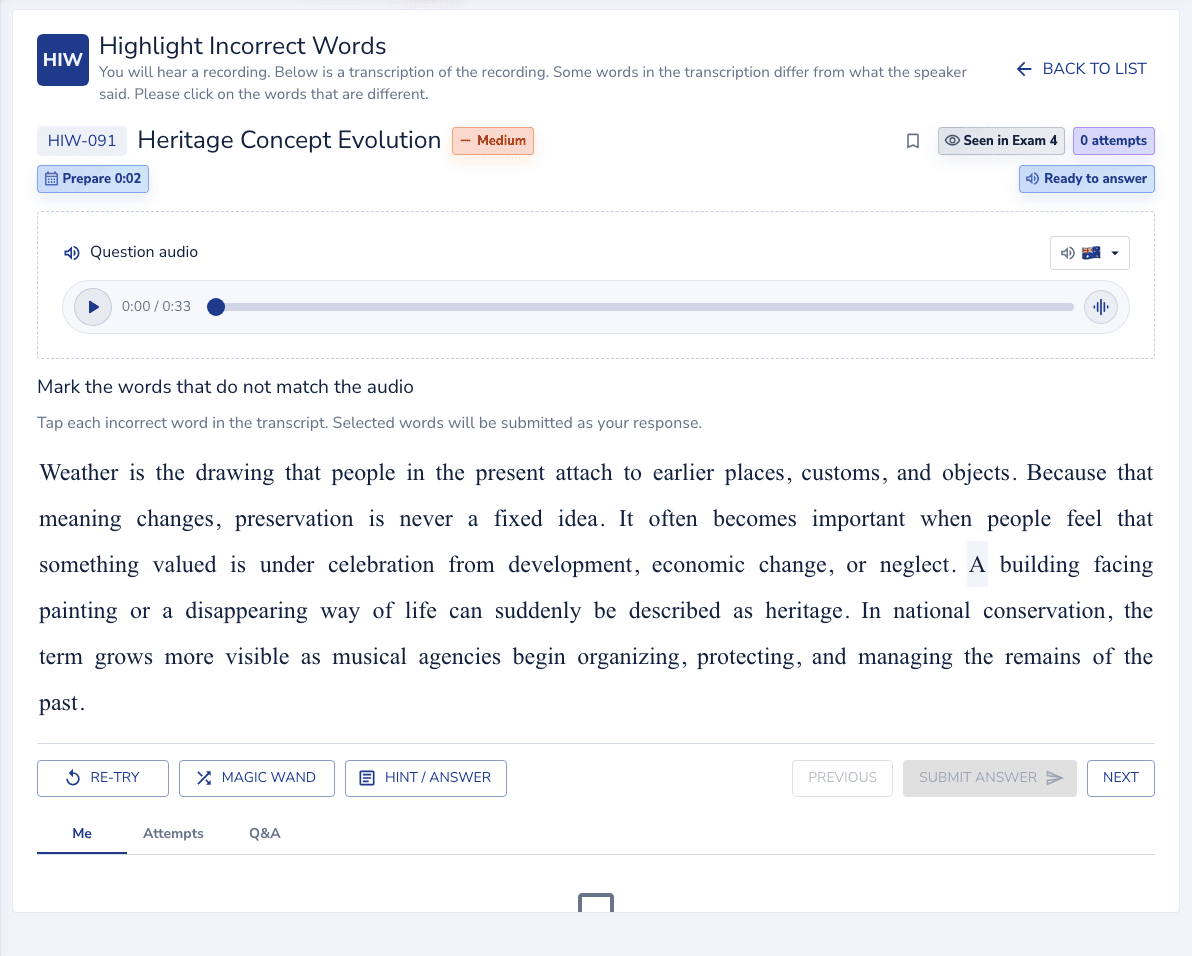
The on-screen transcript about heritage begins: “Weather is the drawing that people in the present attach to earlier places, customs, and objects…” — but the audio differs in a few words. Click the words that differ. (Real bank question — shown in the player below.)
Click 5 words: “Weather” (audio says Legacy), “drawing” (meaning), “celebration” (pressure), “painting” (demolition), “musical” (government).
Every click is a word that genuinely differs from the audio — wrong clicks would cost a point each under this task’s negative marking.
The learner reads ahead of the audio, clicks “drawing” correctly, then clicks “customs” because it sounded unfamiliar, loses the thread for a sentence, and misses “celebration” and “painting”. Three correct clicks, one wrong click, two differing words missed: two points from a possible five.
Partial credit with deductions: one point for each correct word clicked, minus one for each incorrect word clicked, minimum zero for the item. Counts towards both Listening and Reading in both tests.
Each word that really differs from the audio, clicked, is a point. Five differing words means a maximum of five.
Click a word that matched the audio and it cancels one of your correct clicks. Four right and two wrong is two points. The floor at zero means the item cannot go negative, but a few careless clicks can empty it.
Listening and Reading, because the task measures whether you can read a text in step with speech and notice where they diverge.
A missed differing word costs one point. A wrong click costs one point and often a correct click with it, because the wrong click distracted you from the next real difference. Caution wins.
The task is tracking, not reading. The cursor follows the audio, and the click is a reflex to a mismatch, not a judgement about vocabulary.
Put the cursor on the first word during the countdown. Do not try to read the whole transcript for meaning; the differing words are not detectable from the text alone.
Hover along the line word by word at the speaker’s pace. Reading at your own pace, faster or slower, is how the tracking breaks.
When the word on screen is not the word you heard, click it and move on immediately. Do not pause to be sure; the next difference may be three words away.
Jump to the start of the next sentence on screen and wait for the speaker to reach it. A few seconds unmonitored costs at most one word; a whole passage lost costs the item.
For each highlight, ask whether you actually heard a different word there. If the answer is “it looked odd” rather than “I heard something else”, remove it. Then Next.
| Mistake | Why it costs marks | What to do instead |
|---|---|---|
| Reading ahead of the audio | Why it costs marksOnce your eyes are a sentence ahead, you are comparing the text with memory, not with the speaker, and real differences slip past. | What to do insteadCursor on the word being spoken, moving at the speaker’s pace. |
| Clicking words that look wrong | Why it costs marksUnusual or hard words are not differing words. Every wrong click is minus one, and often distracts you into a miss as well. | What to do insteadClick only when you heard a different word at that position. |
| Pausing to be sure | Why it costs marksThe audio does not wait. A two-second pause is five words unmonitored. | What to do insteadClick and move. Review after the audio. |
| Not reviewing the highlights | Why it costs marksA doubtful click left in is a likely minus one that thirty seconds would have caught. | What to do insteadOne pass over the highlights after the audio; remove anything you did not hear. |
| Giving up after losing your place | Why it costs marksThe remaining sentences still have differing words worth a point each. | What to do insteadJump to the next sentence start and rejoin the speaker. |
The tracking reflex is built fast with short daily sets, and reviewing which kind of difference you missed tells you what to listen for.
On EdKnot the audio plays automatically; do not use the replay in practice, because the exam has none. Practise the cursor-tracking method every time.
The review marks each word. Correct clicks, wrong clicks, and differing words you missed. Wrong clicks mean you were judging by vocabulary; misses mean you fell behind.
Changed words are usually the same part of speech and often start the same way: “Weather” for “Legacy” is rare; “painting” for “demolition” is common. Learning the pattern keeps you from clicking on unusual but correct words.
Five minutes following a transcript with your cursor while its audio plays, no clicking, trains the pace-matching the task depends on.
It should be zero across a set. If it is not, the fix is discipline after the audio, not better listening.
Practice set
12 transcripts with answers
Items from the EdKnot bank, each with its answer, on one page. Every item opens in the practice player with its timer, recording and scoring.
Scored per word with deductions, across two or three items in Academic and one or two in Core. These are the typical profiles behind each level.
Most differing words caught, with one missed when the audio ran ahead and an occasional wrong click that cancels it. Around three points of five per item.
Nearly every differing word caught, no wrong clicks, and the cursor never more than a word from the speaker.
Yes. You gain one point for each correctly clicked word but lose one point for every wrong click, with the item floored at zero, so click only the words you actually heard differently.
A transcript on screen differs from the audio in a few words, usually four to seven. You click the on-screen words that differ from what you hear as the audio plays. The recording is 15–50 seconds and plays once.
It contributes to both your Listening and Reading scores.
There are 2–3 items in PTE Academic and 1–2 in PTE Core.
Yes. Click a highlighted word again to remove the highlight. Review every highlight after the audio and remove any you did not actually hear as a different word.
Move your cursor along the transcript at the speaker’s pace and click as a reflex when the word you hear is not the word on screen. Reading ahead or pausing to be sure is how differences get missed.
Click only the words you heard differently. A wrong click cancels a right one.
Practise Highlight Incorrect Words with the real clock and see the answer the moment you submit.